Run the whole tournament from one screen.

SpeedupTournament Manager is an online platform that runs doubles pickleball events end to end — team rosters and payments, round-robin pool play, live standings, and an auto-advancing bracket, all from your browser. No spreadsheets, no scramble.

See how it works Read the FAQ
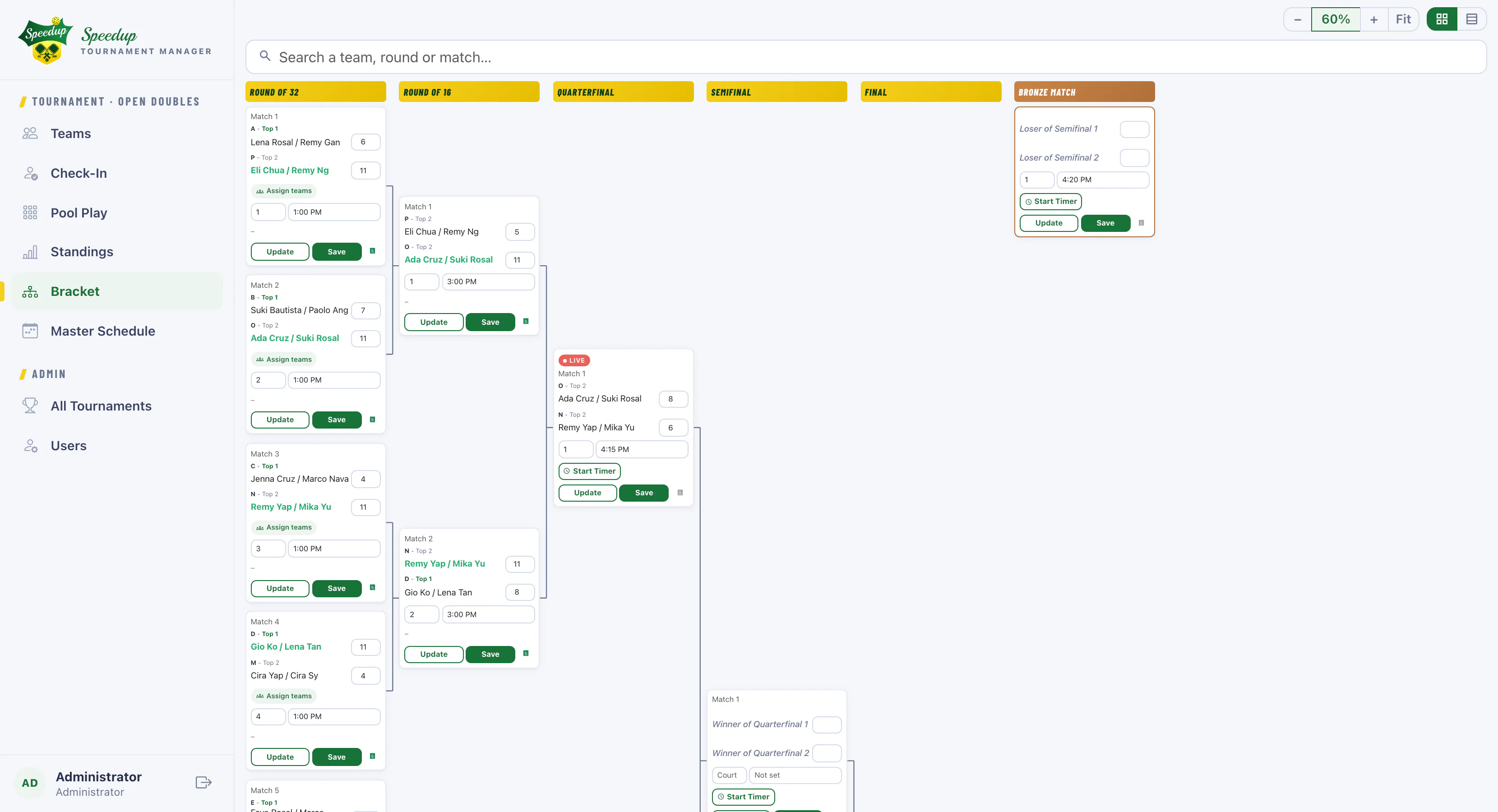
speedup — bracket
Speedup bracket: Round of 32 through the Final plus a Bronze match, with seeding labels and winners highlighted as they advance automatically
4–6 teams per pool Round of 8–64 brackets Live spectator scoreboards Referee tap-to-score mode 100% online — open from any browser

Every part of your event — organized, live, and in one place.

Set up.

Build the event in minutes

Create a tournament, add divisions as categories, and let each one carry its own pool size and bracket format.
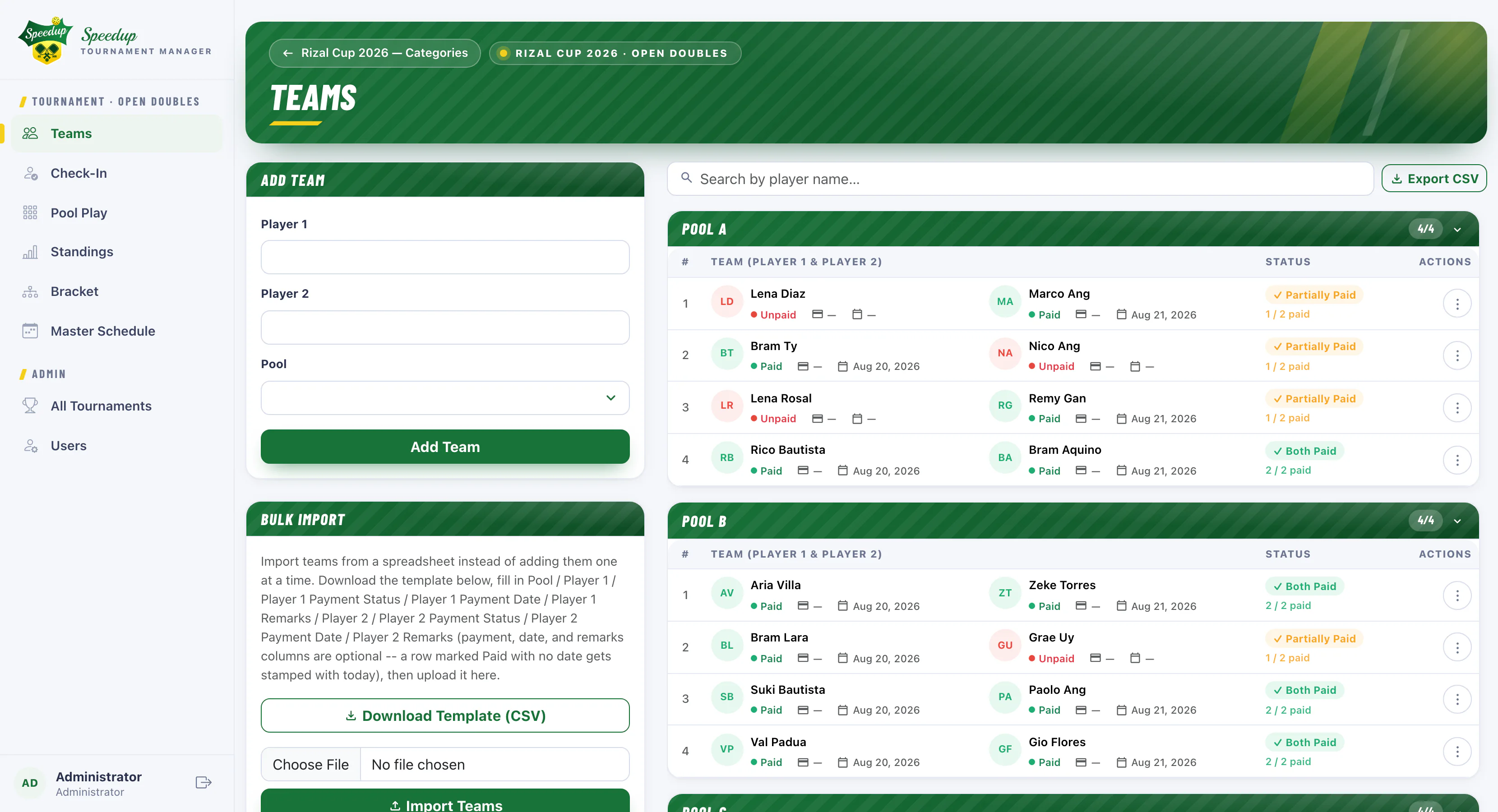
  • Multiple categories per event, each configured independently
  • Team roster with per-player payment tracking
  • Bulk CSV import, or add teams by hand
  • QR self check-in — players scan, no login needed
speedup — teams & payments
Speedup teams screen: pool rosters with per-player paid / partially paid / unpaid status, an Add Team form and bulk CSV import
Play.

Pool play that schedules itself

Speedup generates a balanced round-robin for every pool the moment your teams are in — no team stuck playing three in a row.
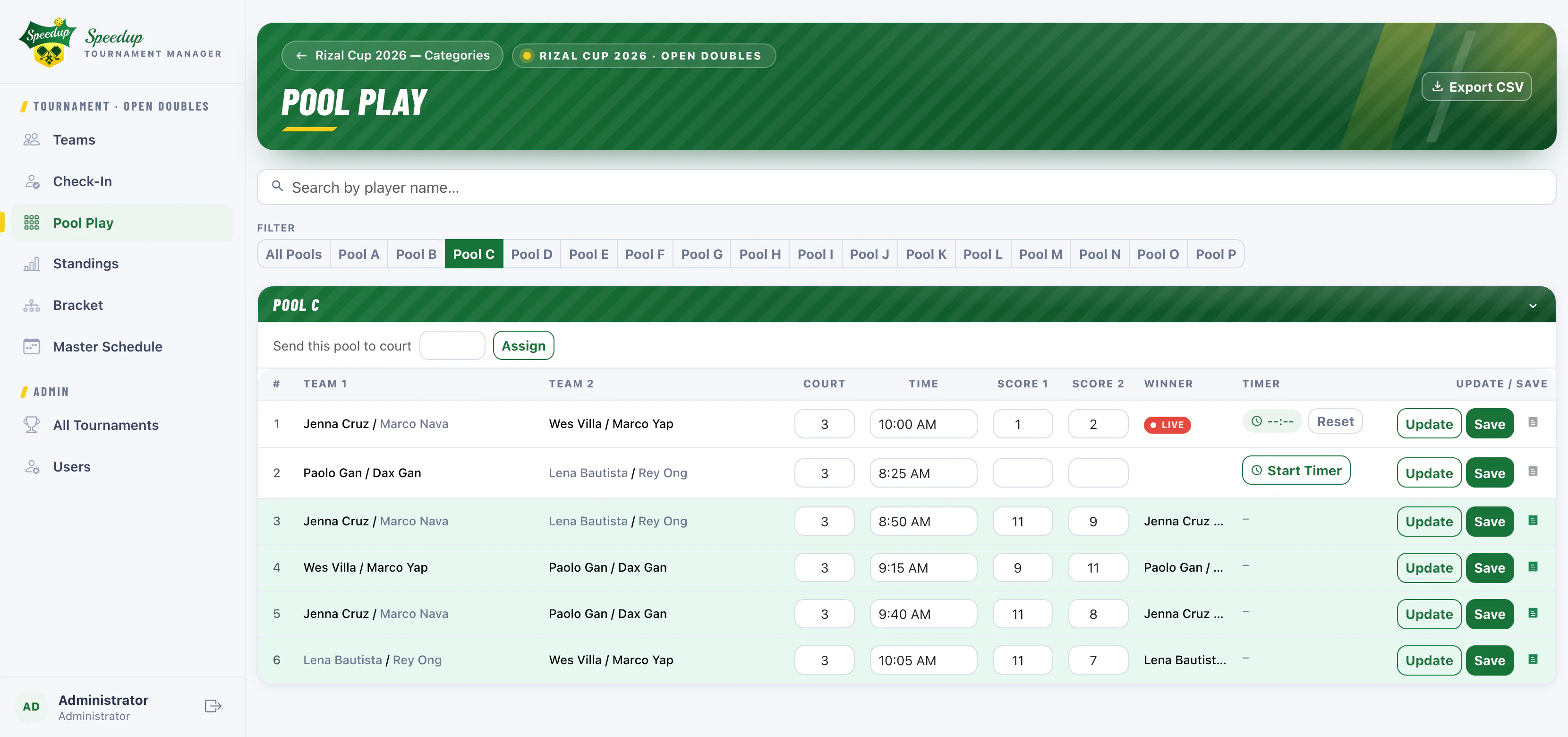
  • Circle-method scheduling, court and time per match
  • Referee mode: tap a name to serve, tap to score
  • Guided side-out logic with R/L server tracking
  • Optional per-match timers for pool play
speedup — pool play
Speedup pool play schedule for one pool: round-robin matches with court, time, scores, winner and a running match timer, one match marked live
Sign.

A signed result, right on the court

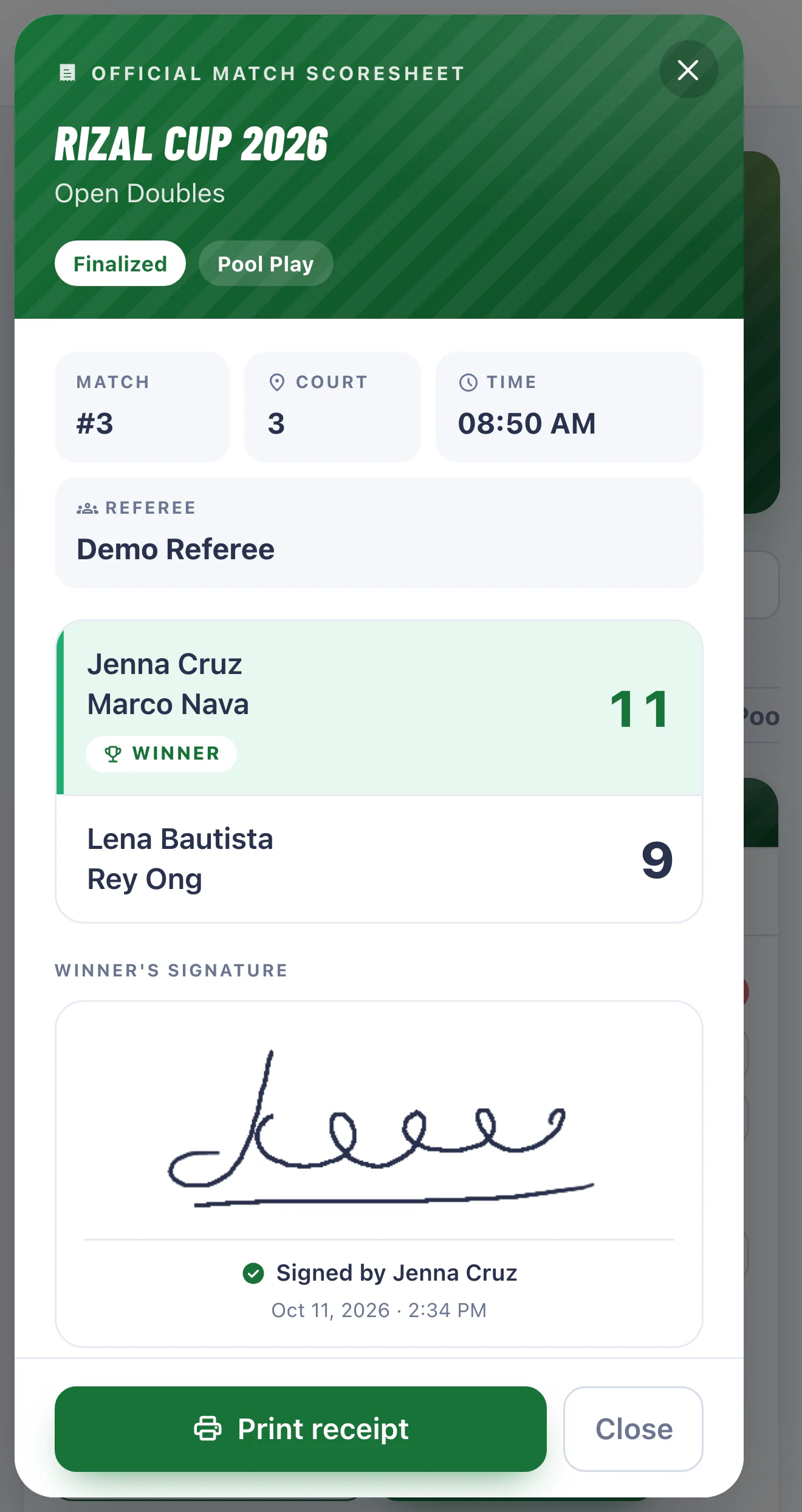
When a match is decided, the winning team signs for it on the referee’s phone. Speedup attaches that signature to an official scoresheet, so every result has a record behind it.
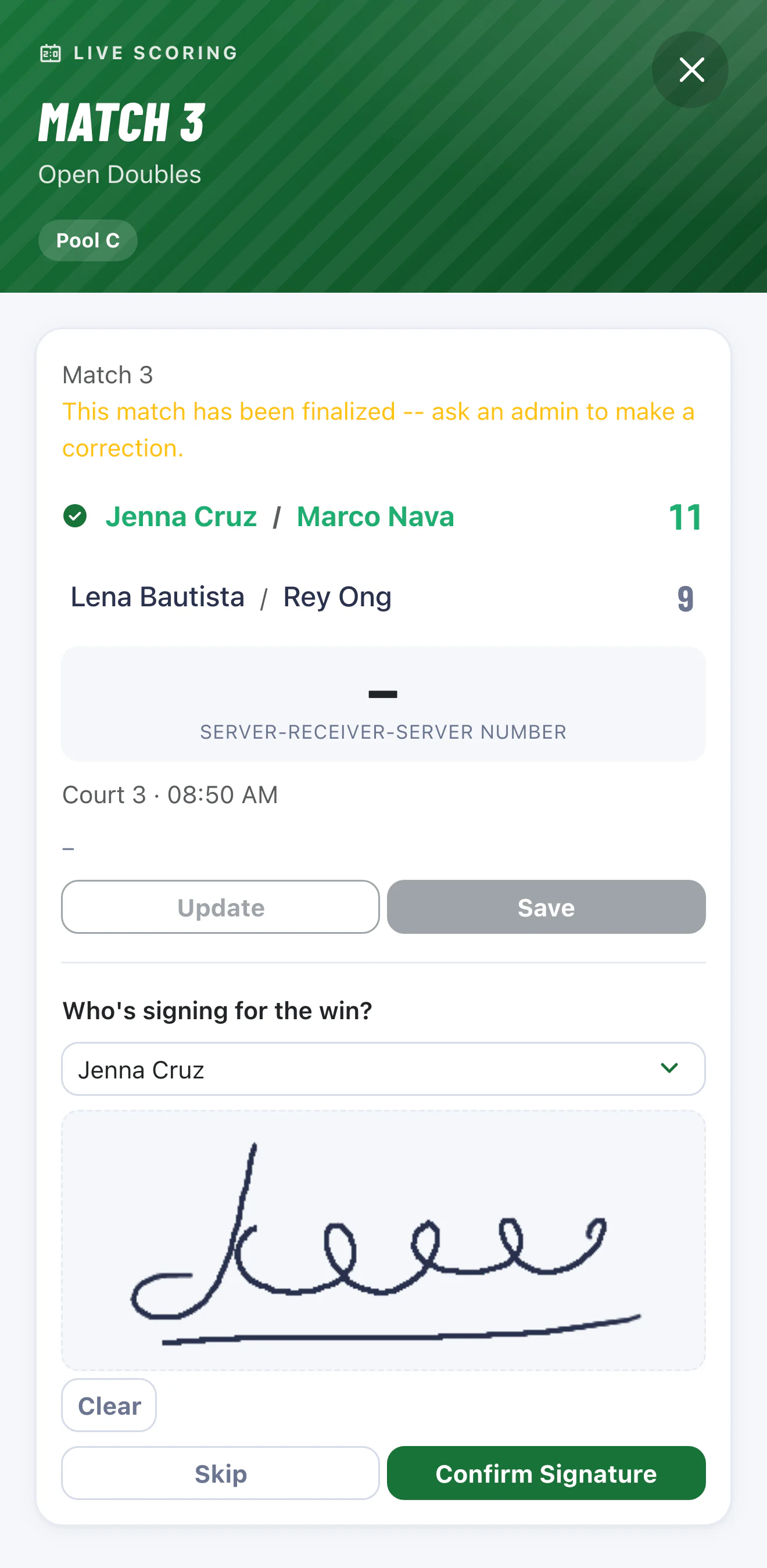
  • Winners pick who’s signing, then sign with a finger or mouse — no paper, no pen
  • In a rush? Skip it — the scoresheet notes that it was skipped
  • One official scoresheet per match: score, court, time, referee and the signature, stamped with date and time
  • Print a receipt in one tap, for pool play and bracket matches alike
  • Correct a score later and the old signature clears itself, so it always matches the final result
Speedup referee phone screen after a match is finalized: a 'Who's signing for the win?' prompt with a winning player selected, a signature drawn on the pad, and Clear, Skip and Confirm Signature buttons
Winners sign on the referee’s phone
Speedup official match scoresheet: tournament and category, match number, court, time and referee, the final score with the winner marked, the winner's signature with a signed-by name and timestamp, and a Print receipt button
Official scoresheet, ready to print
Track.

Standings update as scores land

Wins, losses and point differential recompute on every finalized match. The top two from each pool feed straight into the bracket.
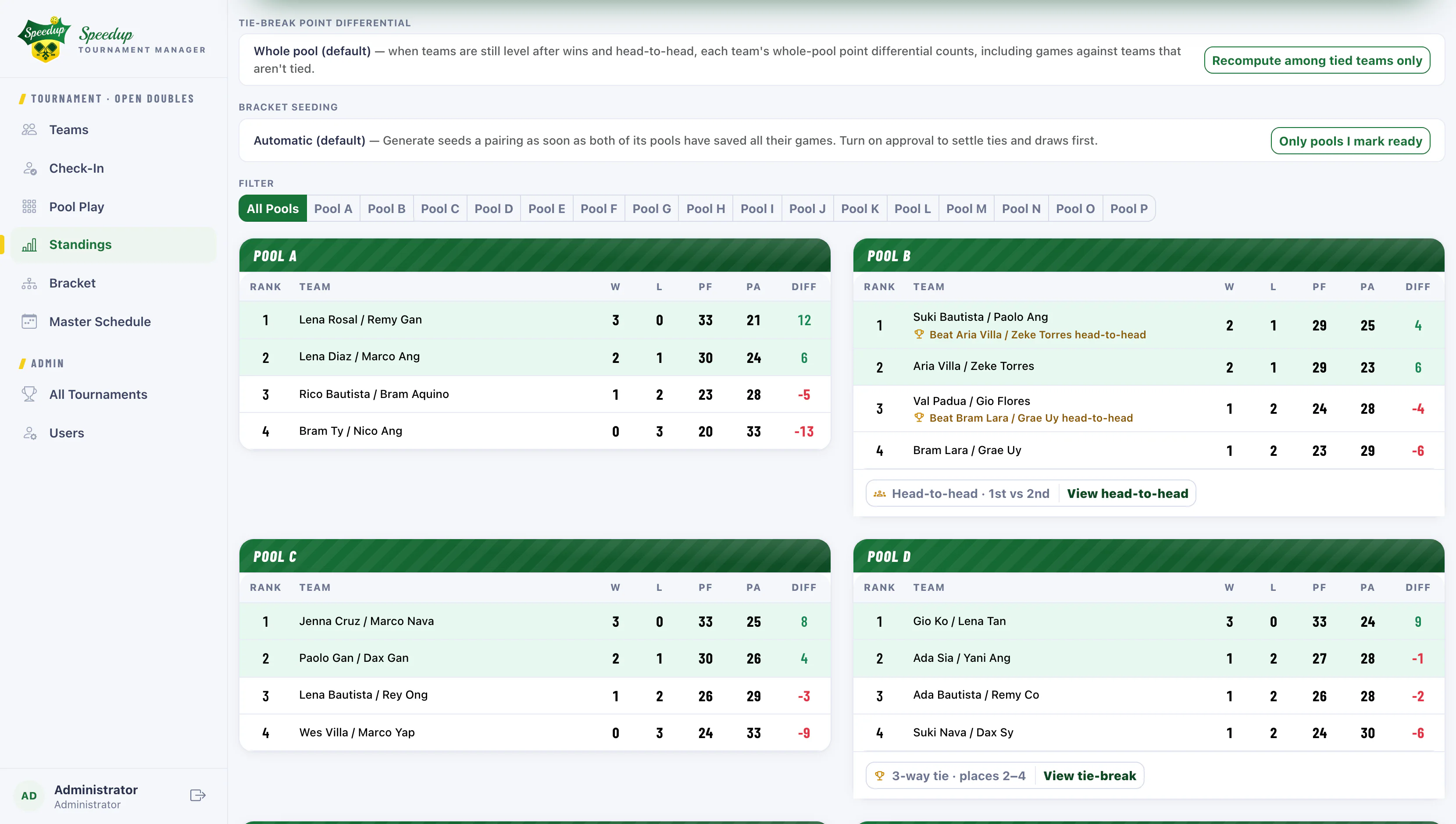
  • Live pool standings with automatic head-to-head tiebreakers
  • Auto-seeded single-elimination bracket
  • Winners advance themselves; Bronze match included
  • Public read-only pages for spectators
speedup — pool standings
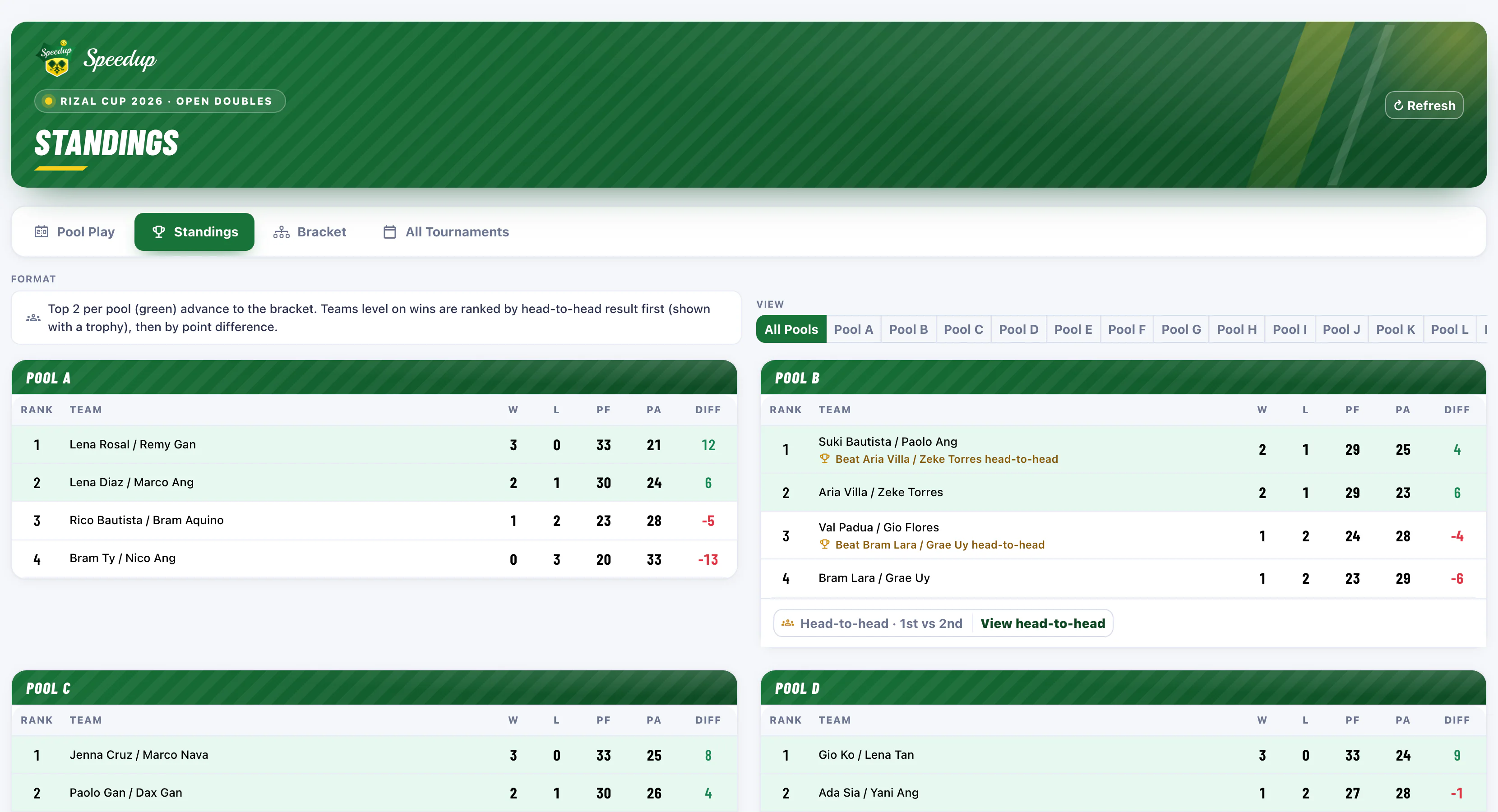
Speedup pool standings: tie-break and bracket-seeding settings above Pools A to D, with wins, losses, points and differential, the top two of each pool highlighted and head-to-head notes where a tie was decided
Settle.

Ties, worked out where everyone can see

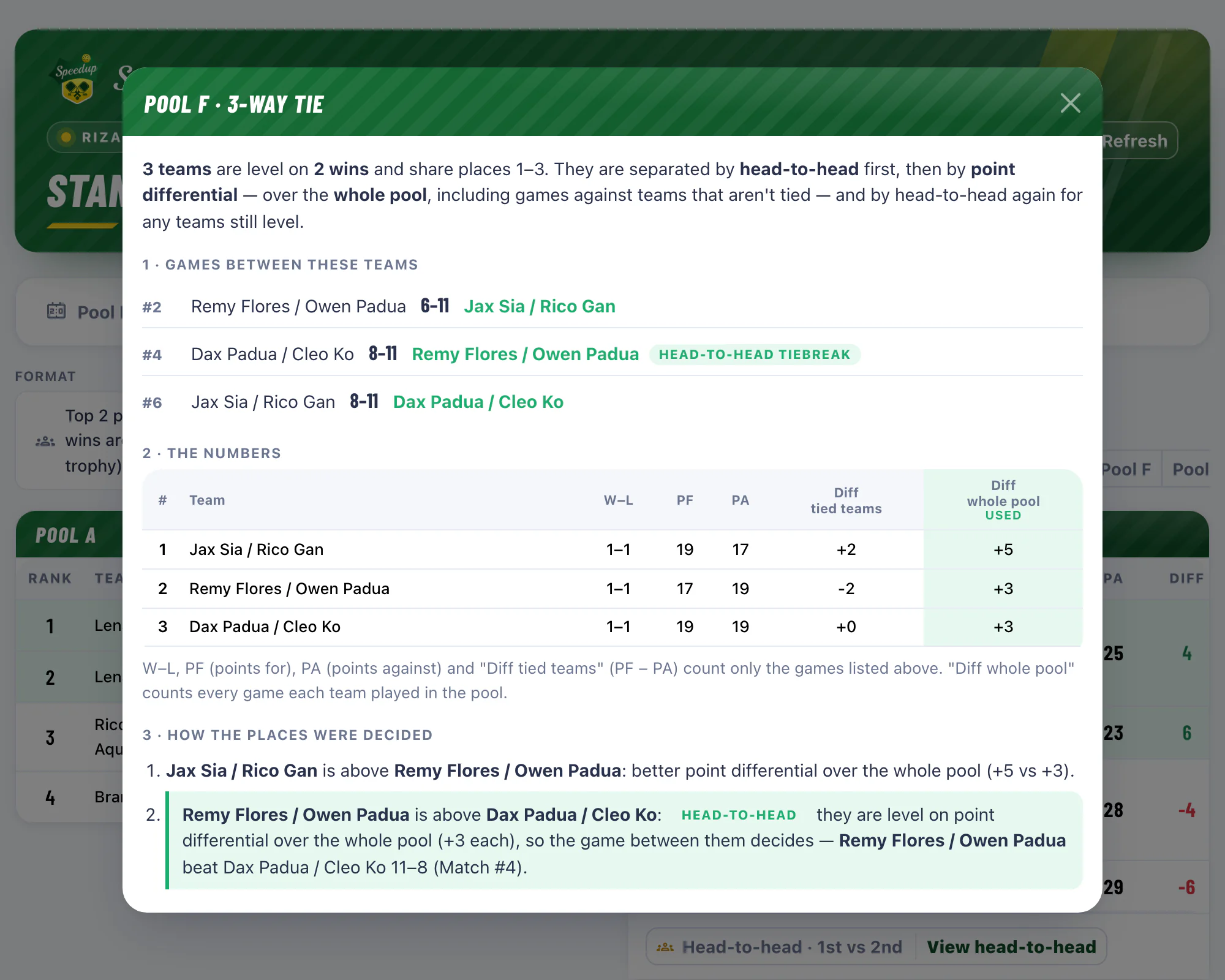
When two or three teams finish level on wins, Speedup ranks them head-to-head first, then by point differential — and shows its work on the public standings. No more “why are they ahead of us?” at the desk.
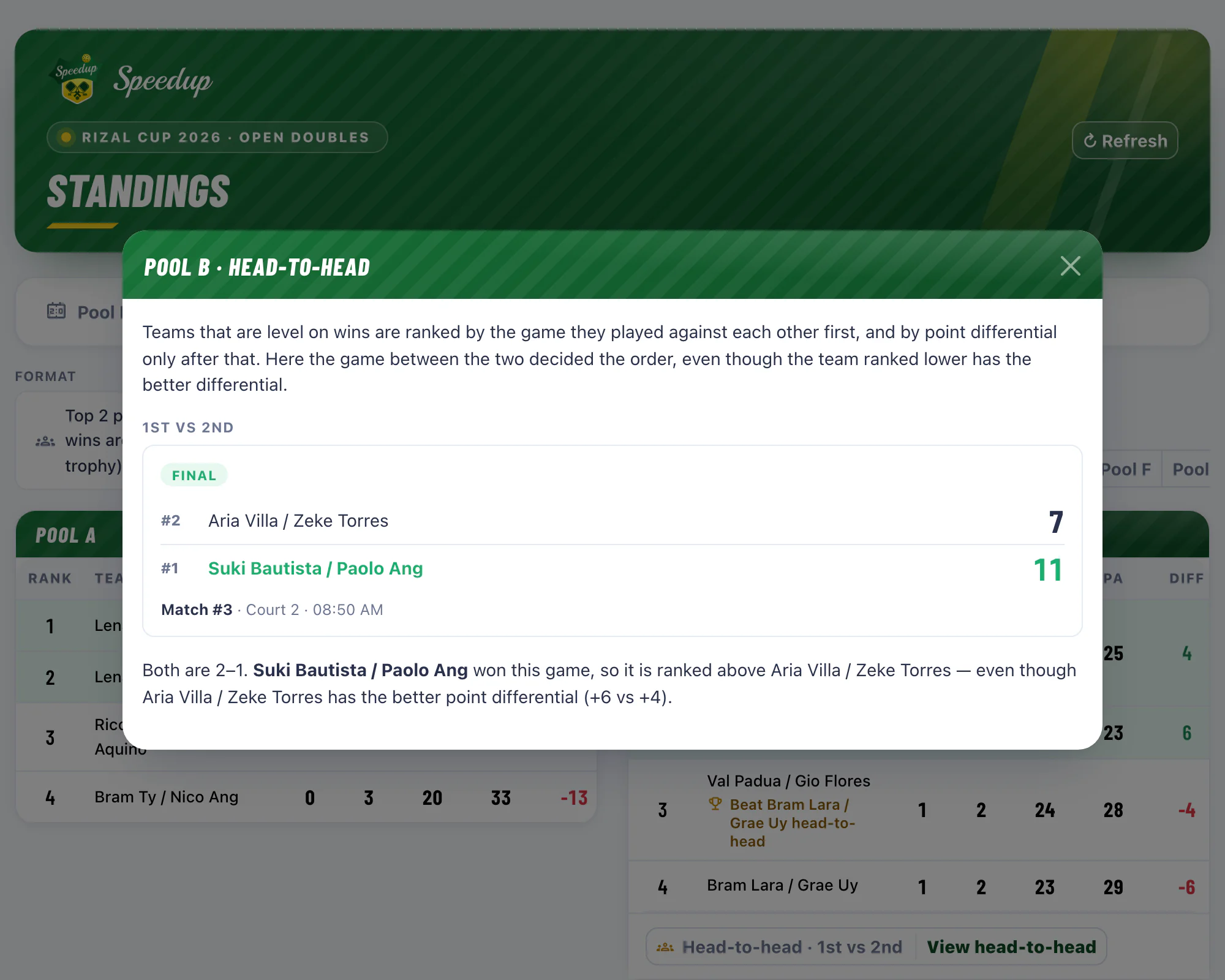
  • Double tie: the team that won the game between them ranks higher, flagged with a trophy line and a head-to-head card with the final score
  • Triple tie: a step-by-step breakdown — the games between the tied teams, each team’s numbers, and the rule behind every place
  • Count point differential over the whole pool, or only the games among the tied teams — set per category
  • Still level on every rule? The page says a draw or coin toss is needed, then shows the result once you record it
speedup — public standings
Speedup public standings with a head-to-head card open: two teams level on wins, the final score of the game between them, and why the winner ranks first despite the other team's better point differential

Two teams level on wins: the game they played against each other decides — even when the other team has the better point differential.
Share.

One live view for everyone on site

Put the standings on a screen at the desk and hand players a link. Pool play, standings and the bracket all stay current on their own — no sign-in, on any device.
  • Public pool play, standings and bracket pages
  • Filter to a single pool or see them all at once
  • Combined master schedule across pools and rounds
  • Tie-break breakdowns players can open themselves
  • One shareable link that updates itself as scores land
speedup — public standings
Speedup public standings page with a pool filter, showing wins, losses and point differential per team, with trophy notes where a head-to-head result decided the order

Score from the sidelines

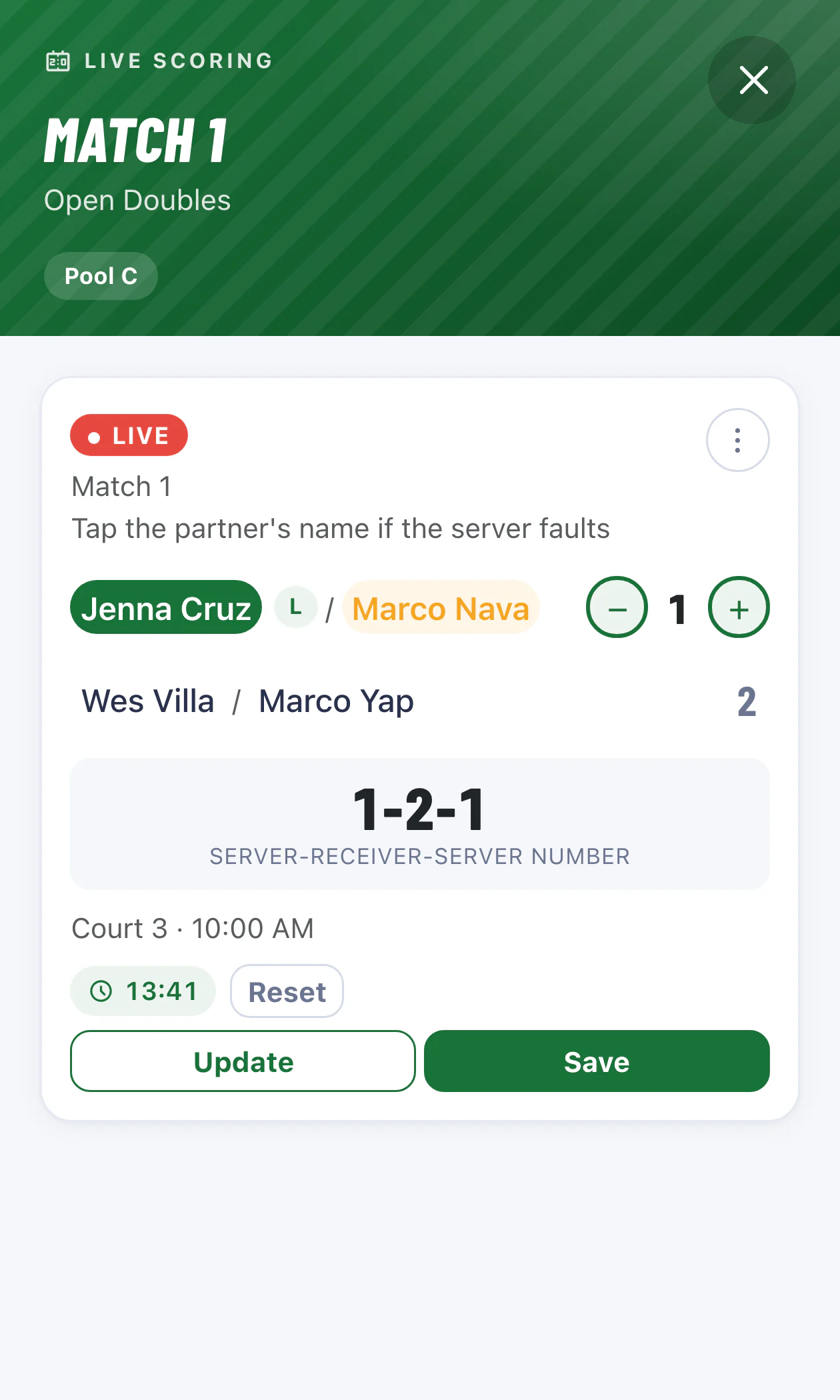
The referee console is built for a phone in one hand — tap a name to set the server, tap to score, and watch the R/L side and server number update on their own.
Any phone browser No install, no login Online, from anywhere
Speedup live scoring on a phone: a live pool match with the serving player highlighted, R/L court side, score steppers, server-receiver-server number, match timer and Update / Save buttons

Built for the people running the courts

⏱

Less time at the laptop

Schedules, standings and brackets build themselves, so you can watch the matches instead of the spreadsheet.

📱

Referees on their phones

A tap-based scoring card that follows the real doubles serve rules, plus an on-screen signature for the winners — no training session required.

👥

Players stay informed

Public pages, a QR check-in and open tie-break breakdowns mean fewer "which court am I on?" and "why are they ahead of us?" questions all day.

🏆

Everything in one place

Rosters, payments, schedules, scores, standings and the bracket all live in one app — nothing gets lost between spreadsheets and group chats.

📈

Scales with the draw

From a Round of 8 club night to a Round of 64 open, with several categories running at once.

💳

Payments tracked

Per-player paid / unpaid status so you always know who still owes at the desk.

Also from Speedup

The Draw Wheel

A live, spin-the-wheel bracket draw. Assign seeds and pool slots in front of everyone, so the draw is random, transparent, and impossible to argue with.

  • Spin to place teams into pools or bracket slots
  • Big-screen friendly for the opening ceremony
  • Same team-and-pool format as the tournament manager — import the draw results straight in, no re-typing
  • Runs on its own — just open it and spin
Open the Draw Wheel
Pickleball Made for doubles pickleball tournaments — pools, brackets, bronze matches and all.

What.
The.
FAQ?

What is Speedup?

Speedup Tournament Manager is an online app for running doubles pickleball tournaments. Organizers set up divisions, teams and payments; Speedup builds the pool schedules, keeps live standings and seeds the bracket. Referees score from their phones, and players follow pool play, standings and the bracket from a link.

Do players need an account?

No. Only organizers and referees log in. Players check themselves in by scanning a QR code, and everything they need to follow — pool play, standings, the bracket — lives on public pages that need no sign-in.

What tournament format does it run?

Round-robin pool play (4–6 teams per pool) feeding a single-elimination bracket — Round of 8, 16, 32 or 64 — with the top two from each pool seeded in. A Bronze match for third place is generated automatically, and later bracket rounds can optionally be best-of-2.

How are ties broken, and can players see how?

Teams level on wins are ranked by head-to-head first — the game they played against each other — then by point differential, counted over the whole pool or only among the tied teams (you pick per category). A two-team tie gets a trophy line and a head-to-head card with the final score; a tie of three or more gets a step-by-step breakdown. If teams are still level on every rule, the standings flag it for a draw or coin toss and show the result once it's recorded. All of it is on the public standings page, with no sign-in.

Can I run several divisions at the same event?

Yes. Each division is a category with its own pool size, bracket size, timers and teams, so a Novice Round of 8 and an Open Round of 32 can run side by side under one tournament.

How do referees score matches?

From a phone. The referee opens the match, taps a player's name to set the server, and taps to record points. The card tracks server number and right/left court side using the real USA Pickleball doubles rules, with a confirm step on every side-out.

Can winners sign off on their result?

Yes. Once a match is decided, the winning team can sign for it on the referee’s phone — pick who’s signing, then sign on the screen with a finger or mouse. Speedup stores the signature on an official scoresheet with the score, court, time and referee, and organizers can print it. Signing is optional, and if a score is corrected later the old signature is cleared, so a sign-off always matches the final result.

What if a score is entered wrong?

A referee's live score can be updated freely until it's saved as final. Once final, the winner is pushed into the next bracket round and only an organizer can make a correction — which keeps later rounds from silently showing the wrong team.

Ready to run a smoother tournament?

Set up your first event and see the whole thing come together.

Message us Chat with us